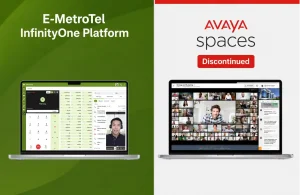


Millions of businesses still run Avaya or Nortel phone systems, including Avaya IP Office 500 V2 and Partner systems, and Nortel Norstar, BCM and CS1000 (CS1K). As Avaya has discontinued legacy PBX systems, and Nortel is long gone, companies are finding it harder to repair their phones, find parts and keep their systems in service.
If you are still using one of these systems, you are probably asking:
- Is there an economical way to fix Avaya or Nortel phones?
- How much longer can these legacy systems be trusted?
- Is there a smarter option than repairing my system every time something breaks?
This guide explains your real options after end-of-life (EOL): what you can still repair, what it costs, the risks of waiting, and how to modernize without throwing away the phones on your employees’ desks.
Key takeaways
- Most Avaya and Nortel legacy systems no longer receive software updates, security fixes or new parts from the manufacturer.
- Repair is still possible with refurbished parts and third-party support, but it is a short-term fix with growing risk.
- Green Migration lets you keep many of your existing Avaya and Nortel phones while moving to a modern, supported platform.
What “End-of-Life” Means for Avaya and Nortel Systems
When a phone system reaches end-of-life, the manufacturer stops selling it and, over time, stops supporting it. Nortel’s enterprise business was acquired by Avaya in 2009, and Avaya has since retired many older platforms. In practice, end-of-life means:
- No new software releases, so no new features and no fixes for newly discovered bugs.
- No security patches, which leaves connected systems exposed to toll fraud and other attacks.
- No new parts from the manufacturer, so replacements come from the used and refurbished market.
- Fewer qualified technicians who know the platform well.
Avaya & Nortel Models That Have Reached End-of-Life
Avaya
- IP Office 500 V2: restricted software releases and increasingly expensive to maintain.
- 9600 Series IP phones: replacement handsets are pricey and harder to find.
- 1400/2400 digital phones: difficult to support in a VoIP world.
- Partner systems: long out of production, with parts available only second-hand.
Nortel
- Norstar, BCM and CS1000 systems: no software or hardware patch updates.
- Nortel digital and IP phones: spare add-on modules and expansion units are limited.
Repairing any of these devices is possible, but it is often expensive, only a temporary solution, and it leads to downtime whenever the right part is not on hand.
Common Challenges After End-of-Life
- Software and firmware limitations: no feature enhancements or bug fixes.
- Hardware failures: expansion modules, IP phones and handset parts are hard to source.
- Compatibility problems: older Avaya and Nortel systems do not work well, or at all, with modern VoIP services, SIP trunks and cloud PBXs.
- Security exposure: unpatched systems are an easy target for toll fraud and eavesdropping.
- Rising support costs: each repair call costs more as parts and skilled technicians become scarce.
Your Repair Options for Avaya and Nortel Phones
If you need to keep your current system running for now, these are the most common options:
Refurbished and used parts
Resellers and online marketplaces still sell refurbished handsets, cards and power supplies. Prices vary widely, quality is not guaranteed, and warranties are usually short.
Third-party maintenance providers
Independent support companies can maintain legacy systems. This can extend the life of your system, but they cannot add new features or security patches that the manufacturer no longer provides.
Keeping spare equipment on hand
Some businesses stock spare phones and cards to reduce downtime. This helps in an emergency, but it ties up money in equipment that will never be updated.
All three options keep you running, but none of them solves the underlying problem: the system itself is no longer moving forward.
Repair or Migrate? A Quick Comparison
| Keep repairing | Rip and replace | E-MetroTel Green Migration | |
|---|---|---|---|
| Keep existing desk phones | Yes | No | Yes, many models |
| Software updates and security fixes | No | Yes | Yes |
| Modern features (mobile apps, softphones, SIP trunks) | No | Yes | Yes |
| Upfront cost | Low, but repeats | High | Lower than full replacement |
| Disruption for staff | Each time something fails | High (new phones, retraining) | Low (same phones on desks) |
How E-MetroTel Green Migration Works
E-MetroTel Green Migration replaces the aging system in the background while keeping what still works on the desk:
- Assessment: we review your current Avaya or Nortel system, phones and wiring.
- Plan: you choose a cloud, on-premises or hybrid deployment that fits your budget.
- Migration: your existing Avaya and Nortel digital and IP phones connect to the new platform.
- Upgrade at your own pace: add modern features now, and replace phones only if and when you want to.
Along the way, you gain access to features like hot-desking, collaboration, softphones, DECT mobility, call recording and SIP trunking, often at a significantly lower cost than a full rip-and-replace.
Benefits of Green Migration for Avaya and Nortel Users
- Retain legacy phones while upgrading to a modern, supported phone system.
- Access business features such as voicemail-to-email and mobile apps.
- Scale from small business to enterprise, across industries including hospitality, healthcare, retail, manufacturing and professional services.
- Get personalized, U.S.-based technical support for a smooth move.
Frequently Asked Questions
Can I still repair my Avaya IP Office 500 V2?
Yes, in many cases, using refurbished parts or third-party support. However, the platform receives limited updates, so repairs keep it running without making it more secure or capable.
Can I keep my Nortel or Avaya phones with a new system?
Often, yes. With E-MetroTel Green Migration, many Avaya and Nortel digital and IP phones can connect to a modern platform, so staff keep the phones they already know.
Is it safe to keep using an end-of-life phone system?
It works, but the risk grows over time. Without security patches, connected systems are more exposed to toll fraud and attacks, and a hardware failure can cause long downtime if parts are not available.
How long does a migration take?
It depends on the size of your system and the number of locations. Because your existing phones and wiring can often stay in place, many migrations are faster and less disruptive than a full replacement.
Upgrade Your Avaya or Nortel System Without Starting Over
Don’t let an aging Avaya or Nortel phone system hold your business back. With E-MetroTel Green Migration, you gain modern, supported communications while keeping your existing desk phones for as long as they last.